Troubleshooting
This section describes how to troubleshoot common issues when installing Illumio on Kubernetes or OpenShift deployments.
Failed Authentication with the Container Registry
In some cases, your Pods are in ImagePullBackOff state after the deployment:
$ kubectl -n kube-system get Pods
NAME                               READY   STATUS             RESTARTS   AGE
coredns-58687784f9-h4pp2           1/1     Running            8          175d
coredns-58687784f9-znn9j           1/1     Running            9          175d
dns-autoscaler-79599df498-m55mg    1/1     Running            9          175d
illumio-kubelink-87fd8d9f6-nmh25   0/1     ImagePullBackOff   0          28s
In this case, check the description of your Pods using the following command:
$ kubectl -n kube-system describe Pods illumio-kubelink-87fd8d9f6-nmh25
Name:         illumio-kubelink-87fd8d9f6-nmh25
Namespace:    kube-system
Priority:     0
Node:         node2/10.0.0.12
Start Time:   Fri, 03 Apr 2020 21:05:07 +0000
Labels:       app=illumio-kubelink
              Pod-template-hash=87fd8d9f6
Annotations:  com.illumio.role: Kubelink
Status:       Pending
IP:           10.10.65.55
IPs:
  IP:           10.10.65.55
Controlled By:  ReplicaSet/illumio-kubelink-87fd8d9f6
Containers:
  illumio-kubelink:
    Container ID:
    Image:          registry.poc.segmentationpov.com/illumio-kubelink:2.0.x.xxxxxx
    Image ID:
    Port:           <none>
    Host Port:      <none>
    State:          Waiting
      Reason:       ImagePullBackOff
    Ready:          False
    Restart Count:  0
    Environment:
      ILO_SERVER:         <set to the key 'ilo_server' in secret
     'illumio-kubelink-config'>
      Optional: false
      ILO_CLUSTER_UUID:   <set to the key 'ilo_cluster_uuid' in secret
     'illumio-kubelink-config'>
      Optional: false
      ILO_CLUSTER_TOKEN:  <set to the key 'ilo_cluster_token' in secret
     'illumio-kubelink-config'>
      Optional: false
      CLUSTER_TYPE:       Kubernetes
      IGNORE_CERT:        <set to the key 'ignore_cert' in secret
     'illumio-kubelink-config'>
      Optional: true
      DEBUG_LEVEL:        <set to the key 'log_level' in secret
     'illumio-kubelink-config'>
      Optional: true
    Mounts:
      /etc/pki/tls/ilo_certs/ from root-ca (rw)
      /var/run/secrets/kubernetes.io/serviceaccount from
      illumio-kubelink-token-7mvgk (ro)
Conditions:
  Type              Status
  Initialized       True
  Ready             False
  ContainersReady   False
  PodScheduled      True
Volumes:
  root-ca:
    Type:      ConfigMap (a volume populated by a ConfigMap)
    Name:      root-ca-config
    Optional:  false
  illumio-kubelink-token-7mvgk:
    Type:        Secret (a volume populated by a Secret)
    SecretName:  illumio-kubelink-token-7mvgk
    Optional:    false
QoS Class:       BestEffort
Node-Selectors:  <none>
Tolerations:     node-role.kubernetes.io/master:NoSchedule
                 node.kubernetes.io/not-ready:NoExecute for 300s
                 node.kubernetes.io/unreachable:NoExecute for 300s
Events:
  Type     Reason          Age                From               Message
  ----     ------          ----               ----               -------
  Normal   Scheduled       <unknown>          default-scheduler  Successfully assigned kube-system/illumio-kubelink-87fd8d9f6-nmh25 to node2
  Normal   SandboxChanged  45s                kubelet, node2     Pod sandbox changed, it will be killed and re-created.
  Normal   BackOff         14s (x4 over 45s)  kubelet, node2     Back-off pulling image "registry.poc.segmentationpov.com/illumio-kubelink:2.0.x.xxxxxx"
  Warning  Failed          14s (x4 over 45s)  kubelet, node2     Error: ImagePullBackOff
  Normal   Pulling         1s (x3 over 46s)   kubelet, node2     Pulling image "registry.poc.segmentationpov.com/illumio-kubelink:2.0.x.xxxxxx"
  Warning  Failed          1s (x3 over 46s)   kubelet, node2     Failed to pull image "registry.poc.segmentationpov.com/illumio-kubelink:2.0.x.xxxxxx": rpc error: code = Unknown desc = Error response from daemon: unauthorized: authentication required
  Warning  Failed          1s (x3 over 46s)   kubelet, node2     Error: ErrImagePull
The messages at the end of the output above are self-explanatory that there is a problem with the authentication against the container registry. Verify the credentials you entered in the secret for your private container registry and reapply it after fixing the issue.
Kubelink Pod in CrashLoopBackOff State
In some cases, your Kubelink Pod is in CrashLoobBackOff state after the deployment:
$ kubectl -n kube-system get Pods
NAME                                READY   STATUS             RESTARTS   AGE
coredns-58687784f9-h4pp2            1/1     Running            8          174d
coredns-58687784f9-znn9j            1/1     Running            9          174d
dns-autoscaler-79599df498-m55mg     1/1     Running            9          174d
illumio-kubelink-8648c6fb68-mdh8p   0/1     CrashLoopBackOff   1          16s
In this case, check the logs of your Pods using the following command:
$ kubectl -n kube-system logs illumio-kubelink-8648c6fb68-mdh8p
I, [2020-04-03T01:46:33.587761 #19]  INFO -- : Starting Kubelink for PCE
https://mypce.example.com:8443
I, [2020-04-03T01:46:33.587915 #19]  INFO -- : Found 1 custom certs
I, [2020-04-03T01:46:33.594212 #19]  INFO -- : Installed custom certs to
/etc/pki/tls/certs/ca-bundle.crt
I, [2020-04-03T01:46:33.619976 #19]  INFO -- : Connecting to PCE
https://mypce.example.com:8443
E, [2020-04-03T01:46:33.651410 #19] ERROR -- : Received a non retriable error 401
/illumio/kubelink.rb:163:in `update_pce_resource': HTTP status code 401 uri:
 https://mypce.example.com:8443/api/v2/orgs/10/container_clusters/
42083a4d-dd92-49e6-b495-6f84a940073c/put_from_cluster, request_id:
21bdfc05-7b02-442d-a778-e6f2da2a462b response:  request_body: {"kubelink_version":"2.0.x.xxxxxx","errors":[],"manager_type":"Kubernetes v1.16.0"} (Illumio::PCEHttpException)
    from /illumio/kubelink.rb:113:in `initialize'
    from /illumio/main.rb:39:in `new'
    from /illumio/main.rb:39:in `block in main'
    from /external/lib/ruby/gems/2.4.0/gems/em-synchrony-1.0.6/lib/em-synchrony.rb:39:in
 `block (2 levels) in synchrony'
In the example above, the request is rejected by the PCE because of a wrong identifier. Open your secret file for Kubelink, verify your cluster UUID and token, and make sure you copy-pasted the same string provided by the PCE during cluster creation.
Container Cluster in Error
In some cases, the container cluster page displays an error indicating that duplicate machine IDs were detected and functionality will be limited. See the screenshot below.
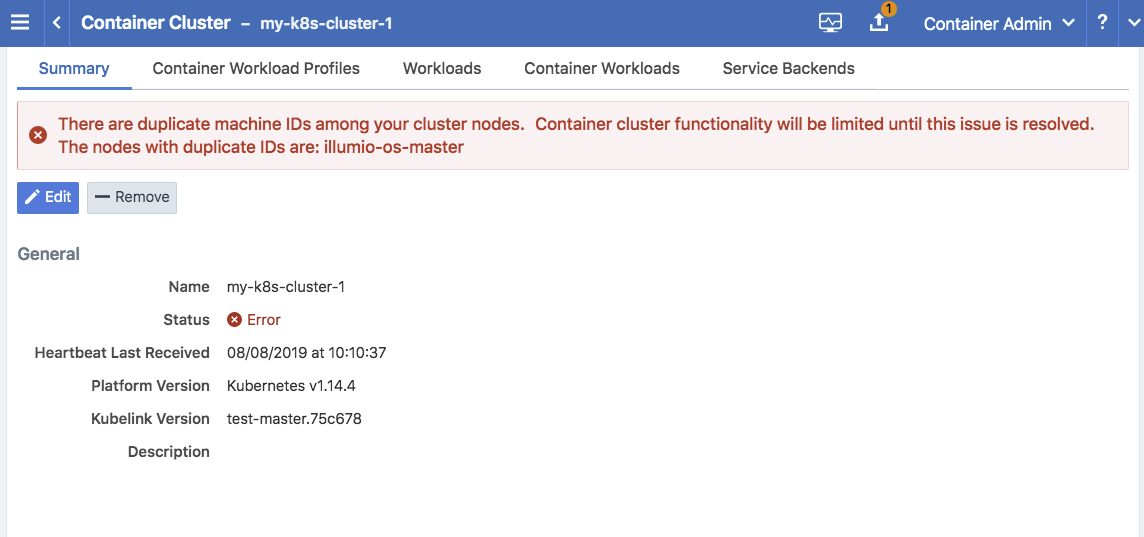
To resolve this error, follow the steps in the section below. After following those steps, restart the C-VEN Pod on each of the affected Kubernetes cluster node.
Verify Machine IDs on All Nodes
To verify machine-ids and resolve any duplicate IDs across nodes:
Check the machineID of all your cluster nodes with the following command:
kubectl get node -o yaml | grep machineID
$ kubectl get node -o yaml | grep machineID
      machineID: ec2eefcfc1bdfa9d38218812405a27d9
      machineID: ec2bcf3d167630bc587132ee83c9a7ad
      machineID: ec2bf11109b243671147b53abe1fcfc0
As an alternative, you can also to check content of the
/etc/machine-idfile on all cluster nodes. The output should be a single newline-terminated, hexadecimal, 32-character, and lowercase ID.If the machine-id string is unique for each node, then the environment is OK. If the machine-id is duplicated across any of the nodes, then you must generate a machine-id for each node which has the same machine-id.
Running the following command displays the output of the machine-id:
cat /etc/machine-id
root@k8s-c2-node1:~# cat /etc/machine-id
2581d13362cd4220b20020ff728efff8
Generate a New Machine ID
If the machineID is duplicated on some or all of the Kubernetes nodes, use the following steps to generate a new machine-id.
For CentOS or Red Hat:
rm -rf /etc/machine-id; systemd-machine-id-setup; systemctl restart kubelet
For Ubuntu:
rm -rf /etc/machine-id; rm /var/lib/dbus/machine-id; systemd-machine-id-setup;
systemctl restart kubelet
Note
Check the machine-id again after doing the above steps to verify that each Kubernetes cluster node has a unique machine-id.
Pods and Services Not Detected
In some cases, the Container Workloads page under Infrastructure > Container Clusters > MyClusterName is empty although the Workloads page has all the cluster nodes in it. This issue typically occurs when the wrong container runtime is monitored by Illumio. To resolve this issue:
Validate which container runtime is used in your Kubernetes or OpenShift cluster.
Open your configuration file for the C-VEN DaemonSet.
Modify the
unixsocksmount configuration to point to the right socket path on your hosts.
Note
This issue typically occurs when containerd or cri-o is the primary container runtime on Kubernetes or OpenShift nodes and there is an existing Docker container runtime on the nodes that is not "active" (the socket still present on the nodes and process still running, mostly some leftover from the staging phase of the servers).
Pods Stuck in Terminating State
In a Kubernetes cluster running containerd 1.2.6-10 as the container runtime, on deleting a Pod while the C-VEN is deployed may result in the Pod being stuck in a terminating state. If you see this error, redeploy the C-VEN and modify the socket path as follows:
Change the volumeMount and hostPath from /var/run to /var/run/containerd in the illumio-ven.yaml file