About this Tutorial
This tutorial includes a series of lessons designed to teach you how to ringfence applications by using two valuable features – Illumination and Policy Generator.
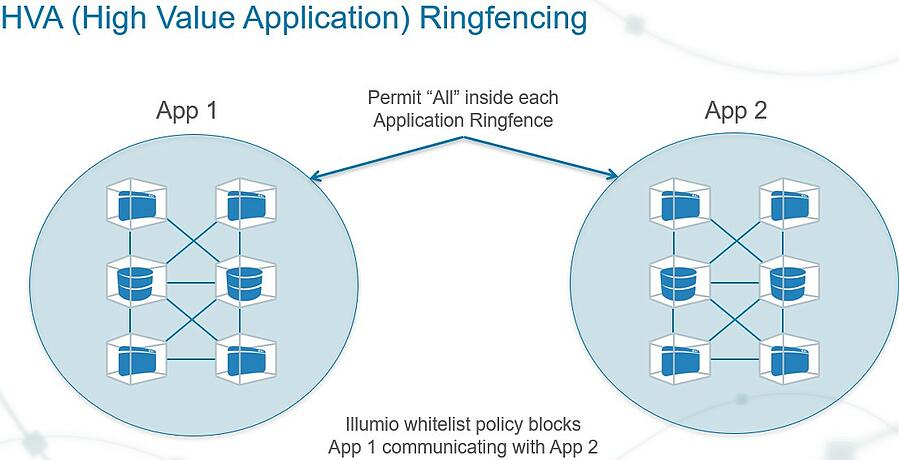
In this tutorial, we describe how to get started with Illumio Core by creating managed workloads and applying application segmentation, also called application ringfencing, which separates individual applications, preventing cross-application communications.
About Application Ringfencing
With Illumio Core, you have the power to model and test segmentation policies at different levels: from course-grained to extremely fine-grained segmentation. Most Illumio customers start by applying application ringfencing to their high-value applications.
Unless the initial deployment must satisfy stated compliance or regulatory guidance, the best initial policies start with ringfencing. Ringfencing shrinks the security perimeter from a subnet or VLAN to a single application. It provides the largest impact with the least amount of work, requiring only one line of security policy per application to close off 90 percent of the potential attack surface for east-west traffic movement.
Additionally, application ringfencing provides the greatest flexibility to application owners and developers. Because there is a “permit-any” rule active within the ringfence, changes to the application’s internal communication will always work. An application ringfence allows all workloads within an application group to communicate over any port.
Essential Concepts
Understanding these concepts will help you complete the solutions in this tutorial and give you a deeper understanding of the Illumio technology.
Tutorial Prerequisites
This tutorial requires you to have the following data, access, and systems.
5 to 20 hosts: Bare-metal servers or virtual machines (VMs) in your datacenter or a public cloud. They can be running Windows or Linux.
Installed packages: The hosts must have the required packages installed.
Development or test applications: The hosts need to have running applications that are generating traffic data. A distributed application is recommended.
Internet HTTPS access over TCP port 443:Illumio Core needs an outward communication connection for HTTPS using TCP port 443.