About Policy
Rules form the core of Illumio's security policy. A policy is a set of rules that define permitted network traffic. Create the rules using labels that identify your workloads.
Understanding Policy
Illumio's Illumio Core allow list model for security policy uses rules to define the allowed communication between two or more workloads. For example, if you have two workloads that comprise a simple application—a web server and a database server—you must write a rule that describes this relationship to allow these two workloads to communicate.
Note
The order in which the rules are written or any possible overlap between rules does not affect the allowlist model since each rule permits some traffic between workloads.
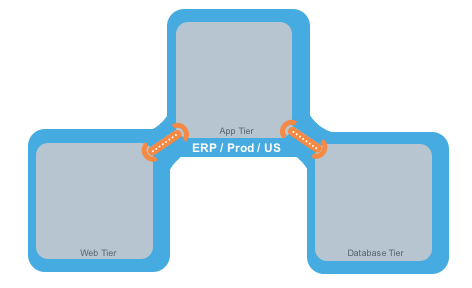
The relationships between the tiers (or workloads, as they are known in Illumio Core) in this example are:
The Web workload can initiate communications with the App workload (Web → App).
The App workload can initiate communications with the Database workload (App → Database).
In Illumio Core, the relationship in the diagram above is expressed as two separate rules:
The Web workload can initiate communications with the App workload.
The App workload can initiate communications with the Database workload.
To build your network security policy, create a policy for each workload. Use labels to identify your workloads and scopes, allowing you to apply policy to multiple workloads simultaneously.
Note
Illumio recommends creating no more than 500 rules per policy; otherwise, the PCE web console will not be able to display all the rules.
If you want to create a policy with more than 500 rules, Illumio recommends splitting the rules across multiple policies or using the Illumio Core REST API, where there is no limit on the number of rules you can create per policy.
Overview of Policy Objects
The Illumio Policy Compute Engine (PCE) includes several objects for defining security policies:
Policy Objects
The Illumio Policy Compute Engine (PCE) includes several objects for defining security policies:
Labels and Label Groups: Group similar labels together and use the label groups in rule writing.
Services: This allows you to define or discover existing services on your workloads. When a workload is paired with the PCE (with a VEN installed), it is scanned for any running processes displayed in the Services list.
Virtual Services: This allows you to label processes or services on workloads. Virtual services can be used directly in rules, or the labels applied to virtual services can be used to write rules.
IP Lists: Create IP lists (allowlists) to define IP addresses, IP ranges, and CIDR blocks that will be allowed access to your applications.
Virtual Servers and Load Balancers: Add F5 Load Balancer configurations to the PCE so you can create a policy for workloads to manage traffic through load balancers.
Pairing Profiles are explained in Configurations in VEN Installation and Upgrade Guide . They allow you to apply specific properties to workloads as the key pair with the PCE, such as applying labels and setting workload enforcement.
User Groups: You can import Active Directory User Groups to write user-based rules for adaptive segmentation.