The Illumio Policy Model
Illumio allows you to manage your security policies using adaptive or static policies. The Illumio policy model allows you to choose how to implement security policies.
About the Illumio Policy Model
Illumio offers a distinct approach to managing security policies for workloads from traditional network security policies. Traditional policies rely on network-specific details like VLANs, zones, and IP addresses, tying security directly to network infrastructure.
In contrast, Illumio uses a multidimensional labeling system to classify and clearly define workload functions. Each workload receives labels based on four dimensions: role, application, environment, and location. These labels enable users to set clear, functional security policies, removing ambiguity from policy definitions.
Users define rules and rulesets using these labels to specify how workloads within their organization interact. The Policy Compute Engine (PCE) then translates these functional, label-based security policies into specific firewall rules applied at the workload's operating system level.
Security Policy Guidelines
The following guidelines are recommendations on how to create your security policy in Illumio Core. Creating a security policy is an iterative process, so following these recommendations will provide a broad initial policy, which can then be incrementally improved until a sufficiently robust policy has been established.
When creating your security policy:
Refine your initial policy to strengthen it by narrowing overly broad access.
Use the Visibility Only enforcement to verify and enact your policy.
Enforcement States
After creating a ruleset, you can preview its potential effects using Illumination's Draft View, which shows what changes will occur once the policy is enforced.
Visibility only: Initially, policies are refined until most traffic lines appear green in Illumination. In this state, no traffic is blocked, allowing verification of policy accuracy. Any new, unaddressed traffic appears as a red line.
Selective enforcement This state enables partial enforcement of policies, targeting specific applications or processes. It helps address vulnerabilities rapidly by enforcing security rules temporarily while the remaining services and ports remain unaffected.
Full enforcement: Gradually implementing full enforcement can minimize disruption by starting with less critical workloads, stabilizing them, and progressively including more sensitive systems. This phased approach reduces potential issues to a manageable number of workloads.
About Rulesets and Rules
Rules form the core of Illumio security policy. A ruleset is a collection of rules defining permitted network traffic. Create the rules using labels that identify your workloads.
Understanding Rulesets and Rules
Illumio's Illumio Core allow list model for security policy uses rules to define the allowed communication between two or more workloads. For example, if you have two workloads that comprise a simple application—a web server and a database server—you must write a rule that describes this relationship to allow these two workloads to communicate.
Note
The order in which the rules are written or any possible overlap between rules does not affect the allowlist model since each rule permits some traffic between workloads.
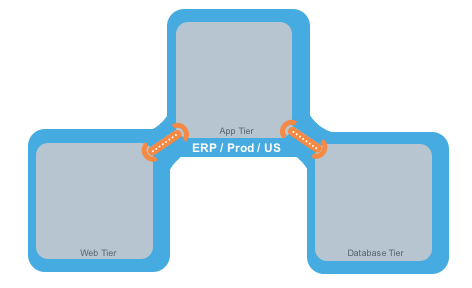
The relationships between the tiers (or workloads, as they are known in Illumio Core) in this example are:
The Web workload can initiate communications with the App workload (Web → App).
The App workload can initiate communications with the Database workload (App → Database).
In Illumio Core, the relationship in the diagram above is expressed as two separate rules:
The Web workload can initiate communications with the App workload.
The App workload can initiate communications with the Database workload.
To build your network security policy, create a ruleset for each workload. Use labels to identify your workloads and scopes to apply the rulesets to multiple workloads simultaneously.
Note
Illumio recommends creating no more than 500 rules per ruleset, or the PCE web console will not be able to display all of the rules.
If you want to create a ruleset with more than 500 rules, Illumio recommends splitting the rules across multiple rulesets or using the Illumio Core REST API, where there is no limit on the number of rules you can create per ruleset.
Overview of Policy Objects
The Illumio Policy Compute Engine (PCE) includes several objects for defining security policies:
Policy Objects
The Illumio Policy Compute Engine (PCE) includes several objects for defining security policies:
Labels and Label Groups: Group similar labels together and use the label groups in rule writing.
Services: This allows you to define or discover existing services on your workloads. When a workload is paired with the PCE (with a VEN installed), it is scanned for any running processes displayed in the Services list.
Virtual Services: This allows you to label processes or services on workloads. Virtual services can be used directly in rules, or the labels applied to virtual services can be used to write rules.
IP Lists: Create IP lists (allowlists) to define IP addresses, IP ranges, and CIDR blocks that will be allowed access to your applications.
Virtual Servers and Load Balancers: Add F5 Load Balancer configurations to the PCE so you can write a policy for workloads for load balancers to manage traffic.
Pairing Profiles are explained in Configurations in VEN Installation and Upgrade Guide . They allow you to apply specific properties to workloads as the key pair with the PCE, such as applying labels and setting workload enforcement.
User Groups: You can import Active Directory User Groups to write user-based rules for adaptive segmentation.