Policies
Scoped users, except Workload Managers, can see rulesets and rules that apply to their applications. A Ruleset Manager can edit the policy, whereas the other scoped roles (Ruleset Viewer and Ruleset Provisioner) can view policies. A scoped user can see all the rules within the application policy.
When label groups are used within the scope of a policy, a Ruleset Manager may not be allowed to edit the policy or its rules, even if there is a scope match between the user's assigned scope and the policy's underlying scope. The user will, however, be able to view the rules within such a policy.
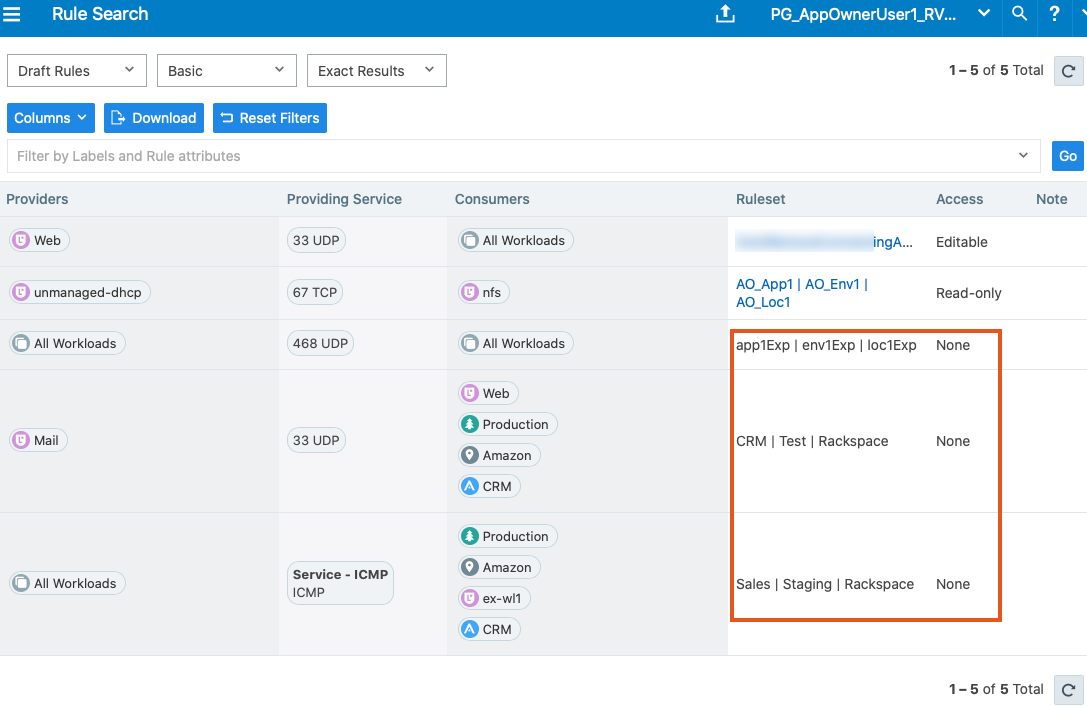
In addition, scoped users can also see rules that apply to their applications. For example, scoped users can view rules written by other applications that apply to their application. To see those rules, click Rule Search from the navigation menu.
On the Rule Search page, a scoped user can see all the rules that apply to their application. This includes rules for incoming and outgoing traffic flows. The rules highlighted in the screenshot below are the outbound rules for your application. The application owner provides visibility into all the rules applied to your application.