Licensing and Usage for Illumio
Illumio offers two products:
Illumio Insights
Illumio Segmentation
Each Illumio product is available as a standalone, subscription-based license priced per workload. Every Illumio customer requires a standalone license. The standalone license allows you to use the product as a SaaS offering, deploy it in an on-premises environment, or operate it in a hybrid deployment model.
Products | License | Deployment Option | Includes | Applicable Workloads in Your Environment |
|---|---|---|---|---|
Illumio Insights | Standalone | SaaS |
|
|
Illumio Segmentation | Standalone | SaaS or on-prem |
|
|
Illumio Workloads
Each standalone license usage is measured by the number of Illumio Workloads (WL) across all of your environments – cloud, data center, and user endpoint.
Illumio Workloads are calculated based on the resource count and the conversion ratio into workload for the different resource types in your environment.
Cloud Resources
Resource Type | Description | AWS | Azure | GCP | |||||||||||||||||||||||||||||||||||||||||||||
|---|---|---|---|---|---|---|---|---|---|---|---|---|---|---|---|---|---|---|---|---|---|---|---|---|---|---|---|---|---|---|---|---|---|---|---|---|---|---|---|---|---|---|---|---|---|---|---|---|---|
Cloud Virtual Machine | A single virtual machine in the public cloud, including nodes in a container cluster and VMs part of a scaling group. | AWS::EC2::Instance | Microsoft.Compute/virtualMachines Microsoft.Compute/virtualMachineScaleSets/virtualMachines | compute#instance | |||||||||||||||||||||||||||||||||||||||||||||
Cloud Databases | A CSP-managed database | AWS::DocDB::DBInstance AWS::DocDBElastic::Cluster AWS::MemoryDB::Cluster AWS::ElastiCache::CacheCluster AWS::RDS::DBInstance AWS::Redshift::Cluster | Microsoft.Cache/Redis Microsoft.DBforPostgreSQL/flexibleServers Microsoft.DBforPostgreSQL/serverGroupsv2/servers Microsoft.DocumentDB/mongoClusters Microsoft.Sql/managedInstances Microsoft.Sql/servers Microsoft.DBforPostgreSQL/servers | sql#instances | |||||||||||||||||||||||||||||||||||||||||||||
Cloud Container Clusters | A managed container cluster | AWS::ECS::Cluster AWS::EKS::Cluster | Microsoft.ContainerService/managedClusters | container#cluster | |||||||||||||||||||||||||||||||||||||||||||||
Other Cloud Network Interfaces[a] | The number of network interfaces minus the number of Cloud Virtual Machines and Cloud Databases. | AWS::EC2::NetworkInterface | Microsoft.Network/networkInterfaces | ||||||||||||||||||||||||||||||||||||||||||||||
[a] Other Cloud Network Interfaces are calculated as Total Network Interfaces minus both Cloud Virtual Machines and Cloud Databases. For example, given a cloud environment with 1000 cloud network interfaces, 400 cloud virtual machines, and 200 cloud databases, the other cloud network interfaces will be calculated as 1000-400-200 = 400 | |||||||||||||||||||||||||||||||||||||||||||||||||
Data Center Resources
Resource Type | Description |
|---|---|
Standard Server Windows and Linux Server Operating Systems | Number of Servers running non-legacy operating system. See VEN OS Support and Package Dependencies on the Illumio Support portal. |
Legacy Operating Systems | Servers running supported legacy operating systems:
|
Oracle Exadata Database | Oracle Exadata database instances |
Kubernetes / OpenShift Nodes | All the nodes in a Kubernetes or OpenShift cluster when using Illumio Containerized VEN (C-VEN) |
Switch Port | Greater of the switch port count or the number of IP addresses managed by the switch when using Illumio Network Enforcement Node (NEN) |
Load balancer | Number of virtual IPs associated with the load balancer when using Illumio Network Enforcement Node (NEN) |
IBM i-series LPAR | Number of IBM i-series LPAR (Logical Partition) |
IBM zLinux IFL | Number of IBM zLinux Integrated Facility for Linux (IFL) |
IBM zOS LPAR | Number of IBM zOS LPAR (Logical Partition) |
User Endpoint Resource
Resource Type | Description |
|---|---|
Endpoint | Count of virtual or physical desktops or laptops |
Determining Resource Count
Here are some ways to estimate the cloud resource count in your environment:
Run the cloud resource count script provided by your technical contact at Illumio.
If you have onboarded your cloud subscription, you can view the actual resource count listed in the Usage page. See Usage.
Daily, Weekly, and Monthly Averages
Cloud resource counts are taken every hour.
To calculate daily usage, the average of the hourly counts over the past 24 hours is used. The monthly average resource count is then calculated by averaging the daily usage values across all days in the month.
Because cloud resources can scale up or down throughout the day, using averages helps mitigate short-term usage spikes and reduces the risk of overage charges.
Data Center and Endpoint resources are metered daily. Their monthly average is calculated by summing the daily counts for the month and dividing them by the number of days.
If you have onboarded your cloud subscription, you can view the actual daily cloud-resource count under the Usage page. See Usage.
Note
Coming Soon: The Usage page will also display actual daily counts for data center and endpoint resources.
Example 1: Daily average calculation for cloud resources
Cloud VM count is metered every hour and recorded in the hourly table. For simplicity, this example assumes the hourly counts remain constant from 1 a.m. to 8 a.m. and 6 p.m. to 12 a.m.
Day 1 | 1:00 a.m. to 8:00 a.m. | 9:00 a.m. | 10:00 a.m. | 11:00 a.m. | 12:00 p.m. | 1:00 p.m. | 2:00 p.m. | 3:00 p.m. | 4:00 p.m. | 5:00 p.m. | 6:00 p.m. to 12:00 a.m. | Daily Average |
|---|---|---|---|---|---|---|---|---|---|---|---|---|
Cloud VM | 100 | 200 | 250 | 300 | 300 | 350 | 300 | 280 | 200 | 210 | 128 | 168 |
Daily Average count = (100 x 8 hours + 200 +250 + 300 + 300 + 350 + 300 + 280 + 200 + 210 + 120 x 7 hours)/24 = 4030 / 24 = 168 resources
Example 2: Monthly average calculation combining cloud, data center, and endpoint resources
Cloud VMcount comes from the daily average calculation (illustrated in Example 1).Standard ServerandUser Endpointare metered daily.For simplicity, this example assumes the daily count for Day 6 through Day 29 remains constant.
Monthly Average | Day 1 | Day 2 | Day 3 | Day 4 | Day 5 | Day 6 - Day 29 | Day 30 | Monthly Average |
|---|---|---|---|---|---|---|---|---|
Cloud VM | 168 | 140 | 150 | 180 | 200 | 220 | 138 | 209 |
Standard Server | 100 | 200 | 300 | 300 | 300 | 350 | 350 | 332 |
User Endpoint | 500 | 550 | 600 | 650 | 700 | 750 | 750 | 725 |
Monthly Average count:
Cloud VM = (168 + 140 + 150 + 180 + 200 + 220 x 24 days + 138)/30 = 6256 / 30 = 209 (each day’s count comes from the daily average table)
Standard Server = (100 + 200 +300 + 300 + 300 + 350 x 24 days + 350)/30 = 9950 / 30 = 332 (count is taken daily)
User Endpoint = (500 + 550 + 600 + 650 + 700 + 750 x 24 days + 750 )/30 = 21750 / 30 = 725 (count is taken daily)
Note
If your Illumio deployment implementation is on premises, you will be asked to provide usage information to Illumio on a quarterly basis at a minimum.
Converting Resource Count to Illumio Workloads
After you determine the number of resources in your environment, lllumio Workloads (WL) are calculated using these the following conversion ratios:
Area | Resource Type | Conversion |
|---|---|---|
Cloud | Cloud Virtual Machine | 1 Virtual Machine = 1 Workload |
Cloud Databases | 1 Database = 1 Workload | |
Cloud Container Clusters | 1 Cluster = 2 Workloads | |
Other Cloud Network Interfaces | 10 Resources = 1 Workload | |
Data Center | Standard Windows and Linux Server Operating Systems | 1 Standard OS = 1 Workload |
Legacy OS | 1 Legacy OS = 2 Workloads | |
Oracle Exadata Database | 1 Database = 10 Workloads | |
Kubernetes / OpenShift Nodes | 1 Host = 6 Workloads | |
Switch Port | 1 MIP = 1 Workload | |
Load Balancer | 1 VIP = 1 Workload | |
IBM i-series LPAR | 1 LAR = 10 Workloads | |
IBM zLinux IFL | 1 IFL = 15 Workloads | |
IBM zOS LPAR | 1 LAR = 20 Workloads | |
User Endpoint | Endpoint | 5 Endpoints = 1 Workload |
Use the workload calculator on Illumio’s website or in the Usage page (see Usage) to convert your resource count into Illumio Workloads.
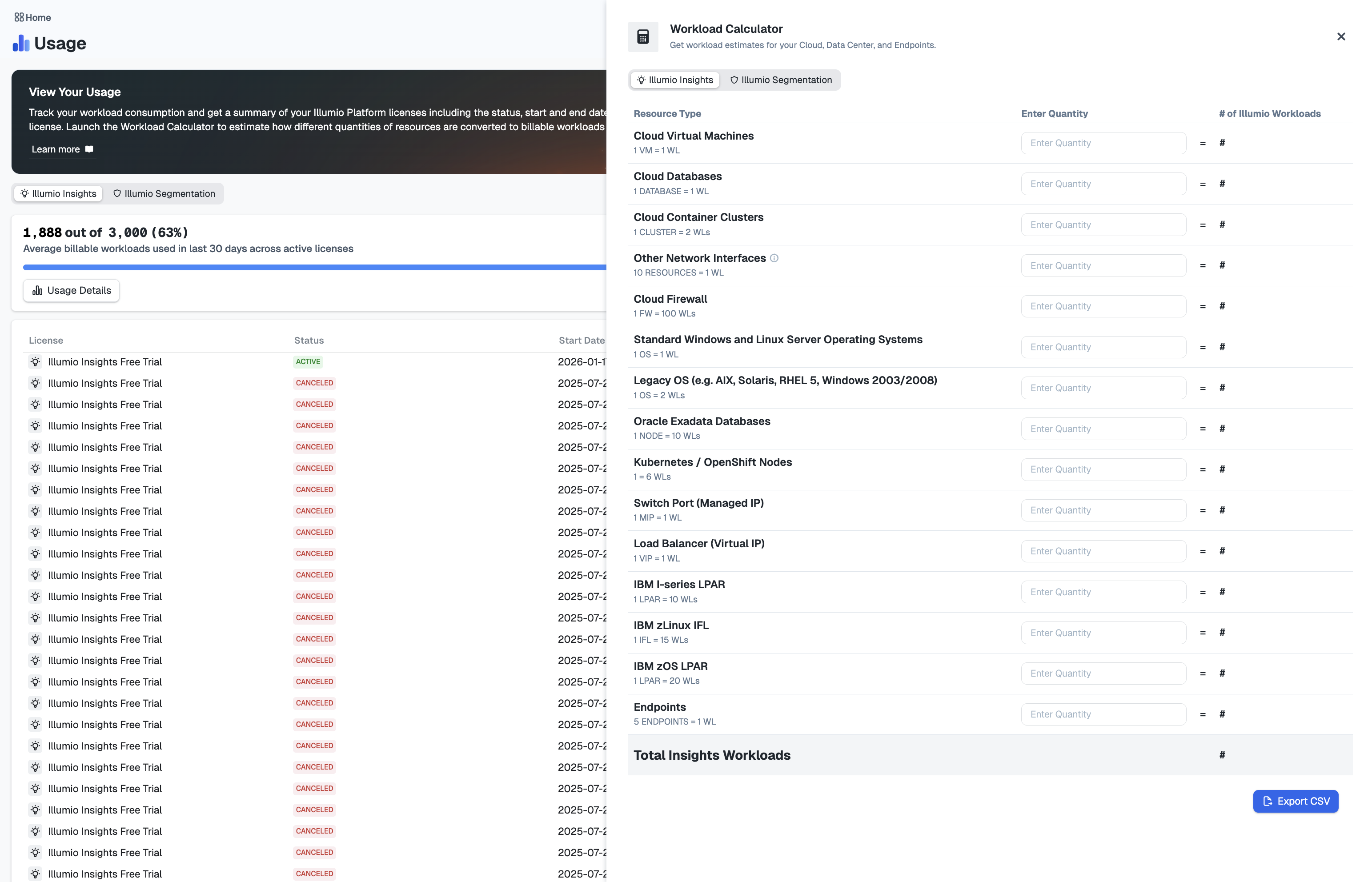 |
Workload calculator on Usage page.
Data Ingestion
Every Illumio workload includes a predefined data-ingestion allowance based on the resource type:
Cloud resources: each workload includes 50MB per day of data ingestion.
Data Center resources: each workload includes 50MB of data traffic retention.
User Endpoint resources: each workload includes 50MB data traffic retention. Since a single workload can support up to five user endpoints, this equates to an average of 10MB of data traffic retention per endpoint.
Resource Coverage Expansion
Illumio continuously enhances its security coverage by adding support for additional resource types. When new resources are added to capabilities, they will be automatically included in your security coverage, which may increase your usage metrics and associated billing.
Tip
As a best practice, Illumio recommends that you review your usage dashboard regularly to manage your consumption effectively. Contact your Illumio account team with any questions about usage trends or billing impacts.