Load Balancers and Virtual Servers for the NEN
Illumio Core supports activation of enforcement on a number of load balancers as listed below.
Supported Load Balancers
F5 BIG-IP 11.5x or later
AVI Vantage 18.23 or later
Citrix ADC (NetScaler) 13.1 or later
Load Balancer and Virtual Server Concepts
Load balancer (SLB): Either a physical machine or a virtual machine performing load balancing functions. An SLB object represents a standalone device or an HA Pair and includes management of IP/port, user/password, and so on. These values are used by an Illumio NEN to read information from and manage the device. In case of HA, it may include multiple SLB devices.
Illumio Virtual Server: The same as a load balancer Virtual Server.
Discovered Virtual Server: An Illumio NEN queries the load balancer for VIPs and specifies the client-facing VIP with port + protocol combination.
Created Virtual Server: Is a provisionable policy object with labels used in policy writing. In the UI, the Virtual Server creation process is called VIP Management. Virtual Server providers (backend servers) are specified using labels and can optionally specify backend port independently of the port used by the VIP.
VIP: Is a virtual IP or a local IP (a front-end IP that clients can connect to).
SNAP pool: Is a group of IPs that the Virtual Servers use to connect to the backend servers. A Virtual Server can only have a single VIP connected to it, on a single port. It can also be accessed by the SLBs local IPs.
About Load Balancers
Illumio Core supports activation of enforcement on a number of load balancers listed below.
Important
Beginning with Illumio Core 19.3.0 release, the Network Function Controller (NFC) is no longer supported. The F5 interface has been moved from the PCE in to the Network Enforcement Node (NEN). Because the NFC has been discontinued, you need to use the NEN to interface with Load Balancers.
By applying labels to your load balancer's virtual servers, you can write rules that allow client workloads in front of the load balancer to communicate with the virtual IP address of the load balancer's virtual servers. By adding labels to the pool members behind a virtual sever, you can allow communication from the load balancer to the members of the pool. The source for this communication is determined by the load balancer. The Illumio Core programs policies on the load balancer to enforce security policy. The NEN uses the load balancer's REST APIs to read and write security policies to configure security rules.
The PCE supports configuration of two load balancer units if they are configured in Active/Standby or Active/Active modes. The PCE needs to be configured with the user name and password of an administrative user who has read-write access to all configurations on the load balancer.
The NEN configures new objects on the load balancer and does not alter any existing configurations. When an Illumio-created object in the load balancer configuration is modified, the NEN detects it as tampering and modifies the configuration back to the intended state so that the correct security policy is enforced.
The Illumio Core dynamically adjusts policies on the load balancer based on application and topology changes in the datacenter so that the Illumio Core can enforce consistent security policy on load balancers across the datacenter and cloud environments, as well as show the application traffic in Illumination. The Illumio Core keeps track of the policy it programmed and reconfigures policy if it was altered on the load balancer manually or by other means.
The NEN makes use of the following constructs on load balancers:
F5 LTM: iRules or LTP policies on the LTM provide capability to restrict application access. When the LTM is used as enforcement mechanism, the NEN uses virtual-server based iRules/LTP policies and Datagroup Lists.
F5 AFM: AFM provides stateful firewalling on BIG-IP. When AFM is used as an enforcement mechanism, the NEN uses Network Firewall policies in the virtual server section and address-lists in the network firewall. The NEN also supports the F5 BIG-IP Application Services 3 Extension (referred to as BIG-IP AS3) when it is used to define virtual servers on the F56 AFM.
AVI: The NEN uses the Network Security Policy rules to program AVI Vantage.
Citrix ADC (NetScaler): The NEN uses responder policies to control access to the Virtual Servers.
Note
Configuring two SLB units in Active/Standby mode is supported. However, clustering is not supported.
F5 BIG-IP Requirements
The NEN uses its REST API to program F5 load balancers, which means that F5 needs to be running a software version that supports REST-API. The requirements include:
BIG-IP 11.5.x or higher
Utilize SNAT or Auto-map mode
AVI Vantage Requirements
AVI Vantage 18.2.3 or higher
Citrix ADC (NetScaler) Requirements
Citrix ADC 13.1 or higher
Configure Load Balancers
You can add a load balancer using the PCE web console. However, before you add a load balancer, you need to pair the NEN with the load balancer functionality enabled with the PCE.
Note
A load balancer does not need to be provisioned to work. However, the virtual servers you associate with this load balancer do need to be provisioned.
Add an SLB from the PCE Web Console
You can add a load balancer using the PCE Web Console. However, before you add a load balancer, you need to pair the NEN with the load balancer functionality enabled with the PCE.
From the PCE Web Console menu, choose Infrastructure > Load Balancers.
Click Add.
Specify a name for the load balancer and provide a description.
From NEN hostname, select the NEN that you want to manage policy programming for this particular SLB.
From Device Type, select appropriate load balancer device type.
From number of devices, select (1) Standard or (2) HA Pair.
The load balancer details are displayed.
Specify the following settings to enable the PCE to connect to the load balancer:
Management IP address or FQDN of the load balancer
Port on which to connect
Username
Password
Select Verify TLS to verify the trust of the TLS certificate provided by the load balancer before connecting to it.
Click Save.
Move an SLB to a different NEN host (single and super cluster)
Note
Requires Core PCE version 22.2.0 or later.
You can move a Server Load Balancer to a different NEN host from the PCE Web Console. This capability preserves – on the moved SLB – all policies already assigned to the managed virtual server.
From the PCE Web Console, go to Infrastructure > Server Load Balancers.
In the Name column, click the link for the SLB you want to move.
On the Summary tab for the selected SLB, click Edit.
In NEN hostname, click the drop down list to select the destination NEN host where you want to move the SLB.
Click Save. The PCE recognizes that the SLB has been moved to the chosen NEN host.
About Virtual Servers
Virtual servers in the Illumio Core contain two parts:
A virtual IP address (VIP) and port through which the service is exposed
Local IP address(es) used to communicate with backend servers (pool members).
A virtual server is similar to a workload. It can be assigned labels and has IP addresses, but does not report traffic to the Illumio Core. Each virtual server has only one VIP. The local IP addresses are used as a source IP address for connections to the pool members (backend servers) when the virtual server is operating in SNAT mode or Auto mode. These IP addresses are likely to be shared by multiple virtual servers on the server load balancer.
A virtual server is identified by a set of labels. The consumers and providers for a virtual server can be assigned different labels, which could place them in the same group or a different group in Illumination. See Groups in Illumination in the Visualization Guide for information.
Providers are allowed to have an incomplete label set (for example, only a Location label), so the providers can be in all groups within the specified location. As a result, a single virtual server can have providers in any group or in any number of groups in Illumination.
Virtual Server Members and Labels
The Illumio Core allows you to write rules to allow communication with workloads managed by a load balancer using labels.
Virtual Server Members
When you configure load balancers in the PCE, it connects to the load balancer using the Illumio Core REST API. The PCE reads all the load balancer virtual servers configurations and populates the Discovered Virtual Servers tab of a load balancer's details page. Any virtual servers associated with the load balancer can be converted to a managed virtual server for use with the PCE. When you configure the virtual server in the PCE web console, you can apply labels to the virtual servers. After configuring a virtual server, you can write a rule that allows other clients to communicate with it.
The members behind a virtual server are specified by configuring a set of labels in the virtual server configuration. A set of four Illumio labels can be applied on the Virtual Server Members tab, which is used to match the same set of labels on workloads in the virtual server's pool. If any of the workloads in the virtual server pool share the same set of four labels specified under the Virtual Server Members tab, then any rule you write with the virtual server also applies to the workload members.
In this diagram, you can see how the workloads that belong to the virtual server pool have the same labels specified on the Virtual Server Members tab:
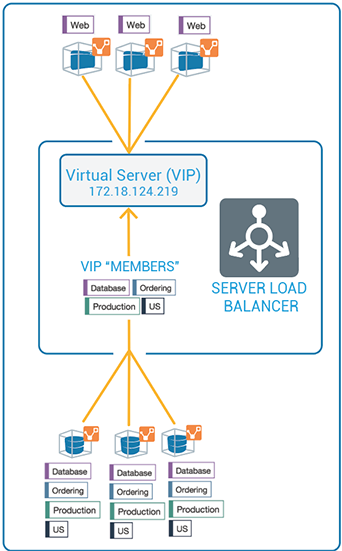
Ruleset Rule for Virtual Server
This diagram illustrates the rule you can write after you label a virtual server and its members:
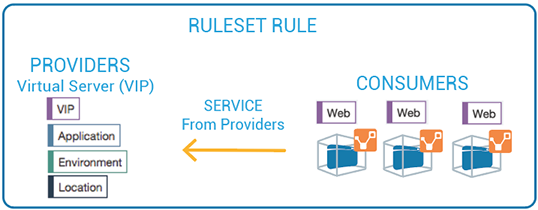
Configure Virtual Servers
After adding a load balancer to the PCE, you can manage its virtual servers. For each virtual server, you can add a complete set of the four Illumio labels: Role, Application, Environment, and Location. Adding labels to the virtual server enables you to add it in a rule.
You add the four Illumio labels to the Virtual Server's Members tab. When the labels specified under Virtual Server Members match labels of workloads in the virtual server pool, any rule you write with the virtual server is applied to the workload members.
Configuring a load balancer's virtual servers consists of these three settings:
Enforced or Not Enforced: When you select Enforced, any rules you write using the labels associated with the virtual servers and any of its members are enacted. Selecting Not Enforced disables the labels and any policy written that affects the virtual server or its members is disabled.
Service: Select the service to use for the rules that allow access to the virtual server. For example, HTTPD 80 TCP.
Labels: You must apply one each of the four Illumio labels to the virtual server: Role, Application, Environment, and Location. Assigning labels enables the virtual server to be used in rules.
Note
Virtual servers are considered a security policy item, so any changes to a virtual server configuration must be provisioned before any of those changes take effect and become active.
Virtual Server Limitations
Illumination does not support location-level and application-level maps.
If a single SNAT pool is shared between multiple virtual servers, the Illumination map does not render correctly.
SNAT and Auto-map modes of F5 virtual servers are supported. Transparent mode is not supported.
Note
Before any virtual server configuration can go into effect, you need to provision your changes. See the Security Policy Guide for information.
Configure the polling interval for discovering new virtual servers
Beginning in release NEN 2.4.10, you can configure how frequently the NEN polls Server Load Balancers (SLBs) to discover new virtual servers (VS). You do this by adding a field to the runtime_env.yml file. In previous releases the timeout value was fixed at 5 minutes, which was too long for some use cases. SLB discovery events are customer-configurable as follows:
Default = 5 minutes. You don't have to modify the runtime environment file if you want to keep the default setting.
Minimum = 2 minutes
Maximum = none
The NEN reads the timeout value at startup and polls SLBs accordingly. If you add this field and/or update the timeout value in the field, you must restart the NEN for the change to take effect.
Procedure
You can modify the runtime environment file on an already-running NEN or when installing a NEN. For details, see the "Install a New Standalone NEN" topic.
Locate the NEN runtime environment file in the following directory:
/etc/illumio-nen/runtime_env.yml
If it's not already present, add the line slb_discovery_timeout_minutes to the file.
Add a space, a colon ( : ), and value of 2 or higher at the end of the line. For example, to configure the SLB discovery timeout to 3 minutes, you'd enter:
slb_discovery_timeout_minutes: 3
Restart the NEN for the new setting to take effect.
If you've updated the timeout value on an already-running NEN, you're done at this point. If you've configured the timeout value as part of a new NEN installation, continue to NEXT STEPS below.
NEXT STEPS
Activate the NEN with a pairing key from the PCE. See the "Obtain Pairing Key and Activate the NEN" section.
To enable the NEN to integrate with a load balancer, see the "Enable Load Balancer Support" section.
(Optional) To configure the NEN as an HA pair, perform the steps in "Configure HA Support" for the NEN.
Filter the Virtual Server List
You can filter the Virtual Servers list by using the properties filter at the top of the list. For example, you can filter and search by label. You can also filter and search by the following objects:
Virtual server mode
Virtual IP address, the VIP port number, or VIP Protocol
Server Load Balancer
Configure a Load Balancer's Virtual Servers
From the PCE web console menu, choose Infrastructure > Load Balancers.
Select the load balancer for which you want to configure virtual servers.
Select the Virtual Servers tab.
Select one of the load balancer's virtual servers and click Manage.
Select one of the virtual servers and click Edit.
Enter a name and description for the virtual server.
To enable the virtual server's policy, select Enforced.
Select a service to associate with the virtual server. The service selected enables that service to be used in rules you write for this virtual server.
Select one each of the four labels to assign to the virtual server.
Click Save.
Before any virtual servers can go into effect, they must be provisioned.