VEN Compatibility with Workloads Hosting Containers
This topic describes how to enable VEN compatibility for workloads that host containers. It covers how to configure the PCE as well as VENs that are supporting the underlying hosts.
Note
This topic describes how to enable VEN compatibility for workloads that host containers. It doesn't describe Illumio support for containers.
Standard VENs are not supported for use in managed containerized environments or overlay networks. If you are operating in a managed containerized environment like Kubernetes or OpenShift, use the Illumio C-VEN. See the Containers User Guide.
How it works
Illumio Core is compatible with use cases where VENs protect workloads that host containers. The VEN can apply an out-of-band policy to traffic on the firewall's forwarding path.
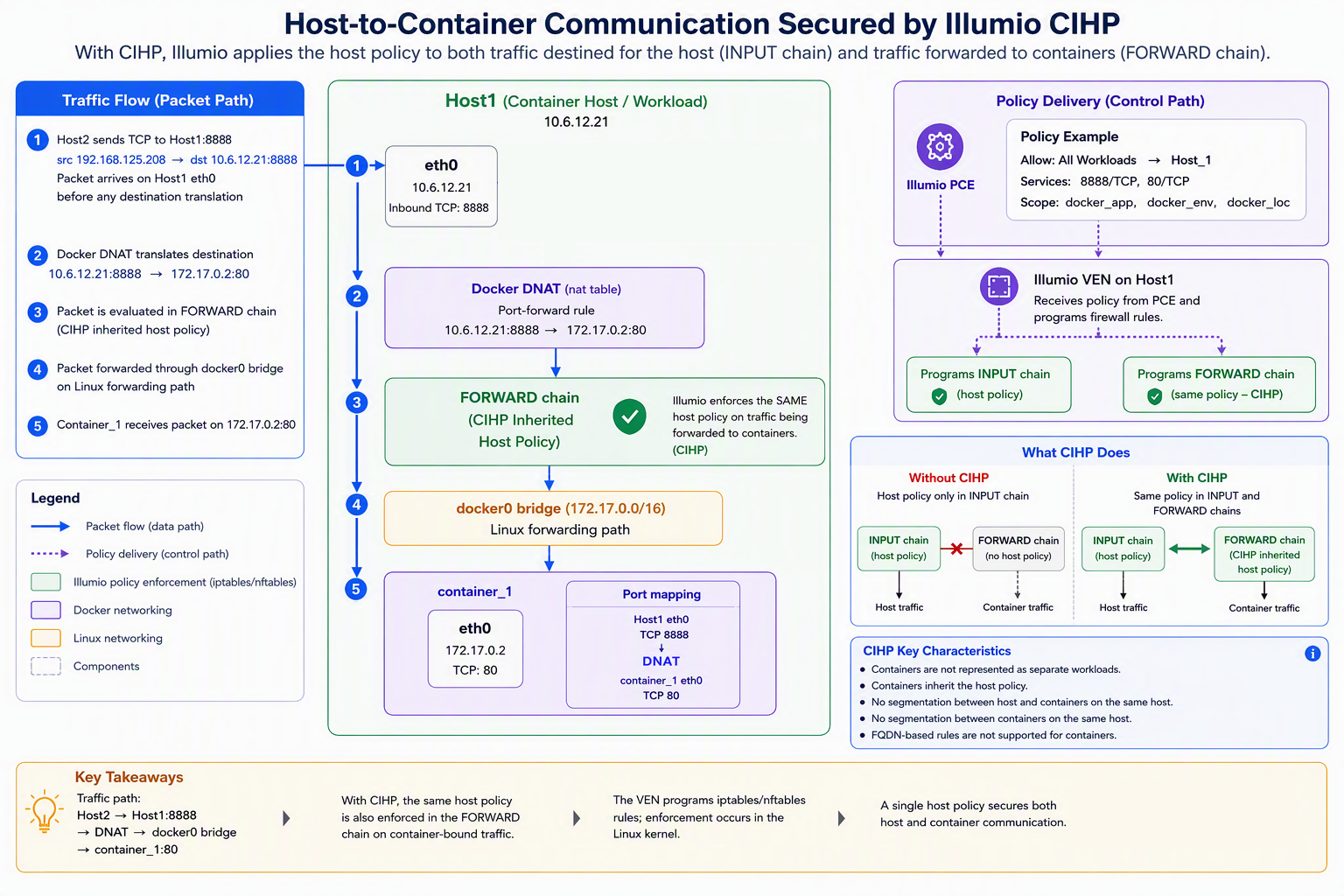
The VEN provides a capability called Container Inherits Host Policy (CIHP) , whereby the VEN applies policies written for a host workload to forwarded traffic. The host, in turn, forwards inbound traffic to the container to its destination, and in this way, the container traffic is subject to the host firewall policy.
Requirements and Limitations
The VEN's interaction with workloads that host containers does not represent a container as a workload (a map or policy object), and each container is implicitly part of the Docker host (the workload).
FQDN-based rules are not supported for any type of container technology with the VEN.
Containers must share the same policies as the host.
CIHP is supported on RHEL 8 / Oracle Linux 8 / Ubuntu 22 and later with Illumio Core 22.5 and later.
In Illumio Core 21.5 and later, if you want to enforce traffic on the container's hosts only, allow all the traffic to containers and bypass CIHP by enabling IP forwarding. See Enable IP Forwarding in the PCE Administration Guide.
No support for segmentation between the host and containers on the same host.
No support for segmentation between containers on the same host.
Verified container engines
Note
Make sure that the VEN is compatible with your version of Linux. See the Illumio Support Portal.
VEN interaction with workloads hosting containers has been verified to be compatible with the following container engines:
Container Engine | Supported Versions as of July, 2025 |
|---|---|
Docker | 19.03 through 28.x |
Podman | 3.0 and 4.0 |
Enable PCE compatibility with workloads hosting containers
If using Docker version 27.x or later, see the Requirements and Limitations about the
br_netfiltermodule.Configure Containers to inherit host policy.
This is disabled by default. Enablement copies the host policy (all Illumio iptables-related rules) into the
filter:FORWARDchain so that packets forwarded to containers are controlled by the Illumio security policy.Set a scope of Illumio labels for hosts with containers:
Go to Settings > Security.
Click the Containers Policy tab and then click Edit.
Add scope for hosts with containers.
You can define a narrow scope with specific label values or a broad scope that encompasses all workloads. See Ruleset Scope in the Security Policy Guide.
Pair workloads with containers. If they are already paired, go to the Security section of the workload's details page and verify that the workload's container settings shows Container Inherit Host Policy: Yes
Write rules to cover the port mapping between the host and the container. Below is an example scenario of container access:
To allow access to the container on Host1 port 80, create an intra-scope rule for access within the application group and extra-scope rule for access from outside of the application group.
The example rule below allows any workload to access container port 80 on Host_1. Notice the service includes the container port 80 and the host port 8888.
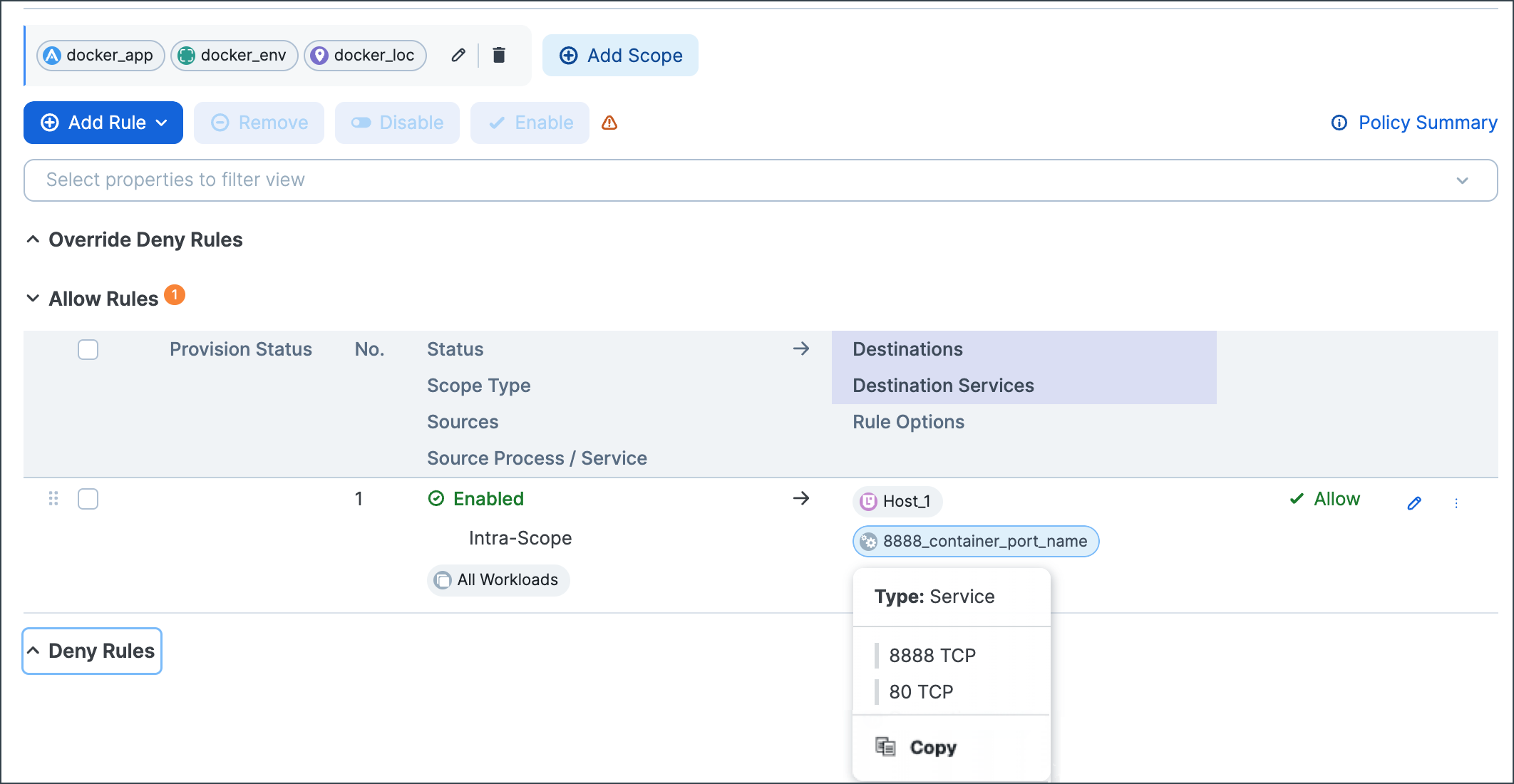
Docker will have rules to NAT port 8888 to port 80.
Verify traffic flows to the containers on the VEN.
Verify in the log at
/opt/illumio_ven_data/log/vtapdrop.logthat there is no dropped traffic to the containers. In the/opt/illumio_ven_data/log/vtapflow.logfile, verify that there are flows to the containers on the VEN when workload is enforced.The highlighted log entry below below shows the flow between host_2 192.168.125.208:54253 to container on Host_1 172.17.0.2:80:
==> /opt/illumio_ven_data/log/vtapflow.log <==
2020-02-03T16:47:15.104-08:00 docker0 O 0 4 192.168.125.208 172.17.0.2 6 64886 80 12286 C 0 U SWID=3c1b9f96-969a-472e-bbbc-9d1c93751ef9 TBI=0 TBO=116
2020-02-03T16:48:15.157-08:00 docker0 O 0 4 192.168.125.208 172.17.0.2 6 64885 80 72339 C 0 U SWID=3c1b9f96-969a-472e-bbbc-9d1c93751ef9 TBI=0 TBO=116
Inbound traffic from Host_2 to Host_1 will not be shown in
vtapflow.log, only traffic to container IP address from Host_2.