Firewall Coexistence
To provide additional security, you can supplement Illumio's firewall with your organization's firewalls using Firewall Coexistence. You can set the Illumio firewall to either Exclusive mode or Coexistence mode via the PCE web console or the Illumio REST API. In both modes, the Illumio firewall is always separate from other firewalls.
Note
Using Firewall Coexistence requires careful consideration
Illumio cannot prevent any non-Illumio processes from programming the firewall, so interference from non-Illumio processes is always possible. The server VEN is able to detect many cases of such interference and will report them as firewall tampering. Although Illumio expects to have exclusive control over the firewall by default, it is possible to coexist with non-Illumio processes depending on exactly how the non-Illumio processes are programming the firewall.
Because the VEN has no way to know about the actions of non-Illumio processes, coexistence necessarily results in the loss of some visibility and clarity in traffic reporting. For example, server VENs are usually able to coexist with:
Many versions of stand-alone Docker and other simple containers
Manually programmed rules, depending on the precise details
Windows GPO, depending on precise details
Many anti-virus solutions
Server VENs aren't able to coexist with complex containers such as Kubernetes. For such cases, consider using the C-VEN.
Firewall Coexistence and Endpoint VENs
Endpoint VENs are in Firewall Coexistence by default. This cannot be changed.
Important
The Firewall Coexistence feature deprecates these features:
Windows FAS VEN coexistence
Linux VEN NAT ignore
Linux VEN container mode
Coexistence Mode by Operating System
Coexistence Mode is a key architectural feature of Illumio’s enforcement model, designed to support interoperability with native and third-party firewalls. By evaluating rule injection behavior and maintaining policy integrity, Illumio ensures consistent security outcomes across diverse platforms. This section provides an OS-specific breakdown of how Coexistence Mode is implemented and what visibility and control mechanisms are in place.
Firewall Tampering Protection
The purpose of Illumio Firewall Tampering Protection is to automatically detect and remediate, where possible, changes to firewall rules that would interfere with Illumio policy.
Note
For firewall types that are fundamentally coexisting, such as WFP and NFT, it's not feasible to detect or remediate tampering that occurs outside of Illumio "table spaces."
Standard tampering detection behavior means that Illumio reviews external rule injections for policy impact. Illumio permits such injections only if it determines that no conflict with Illumio's defined policy is possible. Non-disruptive injections are tolerated.
Non-standard tampering detection behaviors are detailed in the Coexistence Mode by Operating System tables above.
Configure Firewall Coexistence
Note
You can configure firewall coexistence from either the PCE web console or the Illumio REST API.
Define a scope to specify the workloads you want Firewall Coexistence to apply to. The scope comprises the labels that identify your target workloads.
From the PCE web console menu, go to Settings > Security > Firewall Coexistence.
Click Edit.
Click Add.
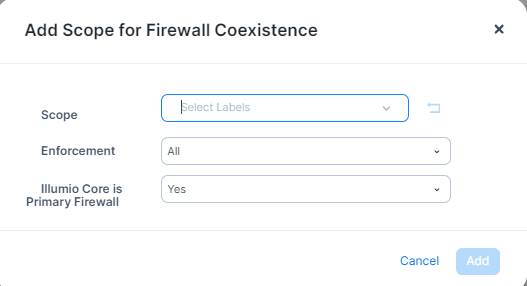
From Scope, select the labels that identify the workloads you want Firewall Coexistence to apply to.
From Enforcement, select All, Enforced, or Illuminated (Visibility).
In the Illumio is Primary Firewall, select either Yes or No.
When finished, click Add.