is/is not filter options
You can easily modify filter results using the "is/is not" options available in Traffic and Map views. These are useful when you're looking at search results and you want to easily modify the query by adding or removing filtering criteria.
Map view
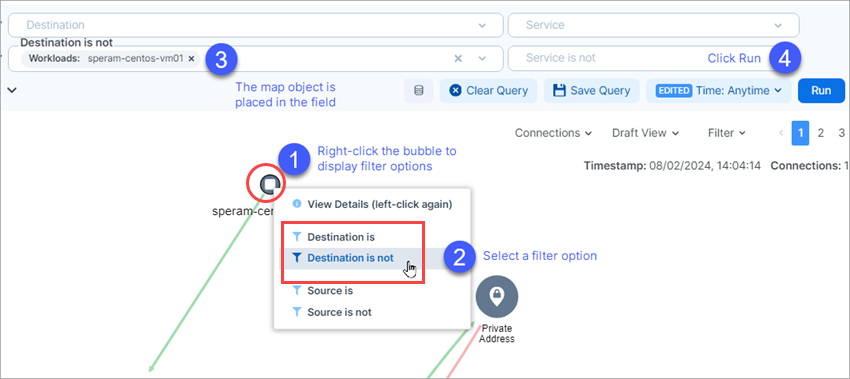
Right-click a bubble on the map for the list of options to appear.
Select whether to include or exclude the data from the source or destination search fields.
Notice your selection popluating the search field.
Click Run to see modified query results.
Traffic view
Tip
This feature also applies to pills on the Traffic tab available in the Map's details panel.
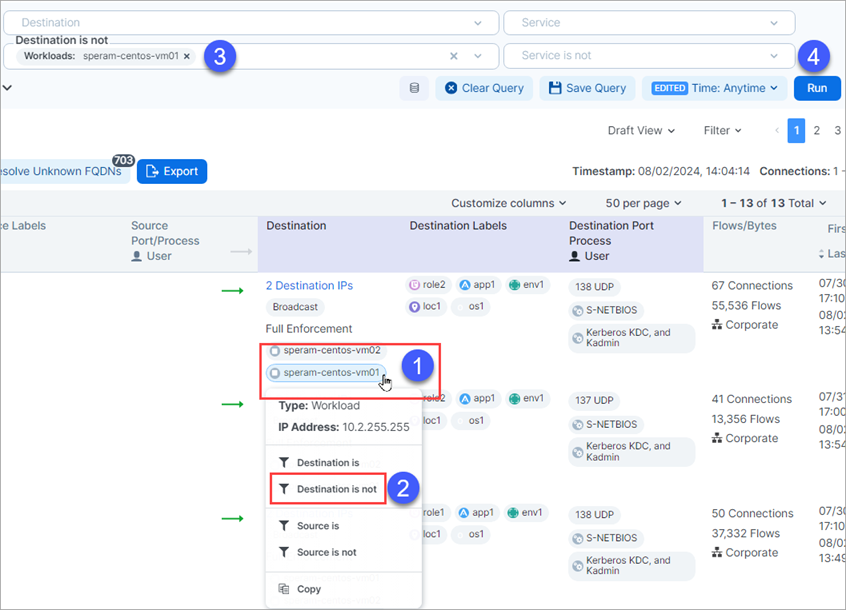
Mouse over any data pill for the list of options to appear.
Select whether to include or exclude the data from the source or destination search fields.
Notice your selection popluating the search field.
Click Run to see modified query results.