NEN Integration with Switches
Learn how to create security policy and apply those policies on the switches for use with the NEN.
Note
In the NEN Guide, the term "switch" refers to both switches and routers.
How the NEN Receives Switch Data
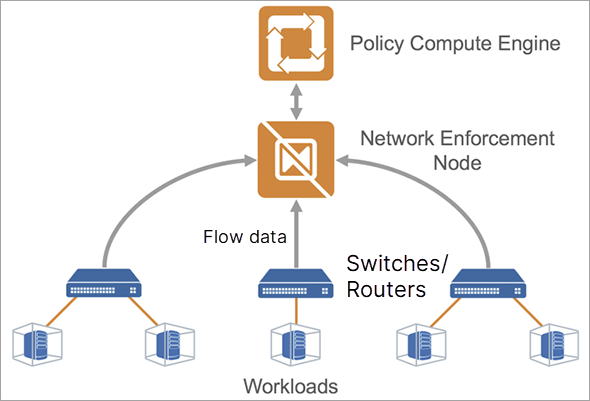
You can configure your switches to send flow data to a flow data collector, such as the NEN. An Illumio Core administrator can configure the NEN to listen for flow data from switches and associate workloads to those switches. The NEN receives flow data directly from the switches, summarizes it, and uploads it to the PCE. You can view this traffic flow in the Illumination® map and stream it out of the PCE through UDP in Splunk, CEF, or LEEF formats.
Extended Policy Model
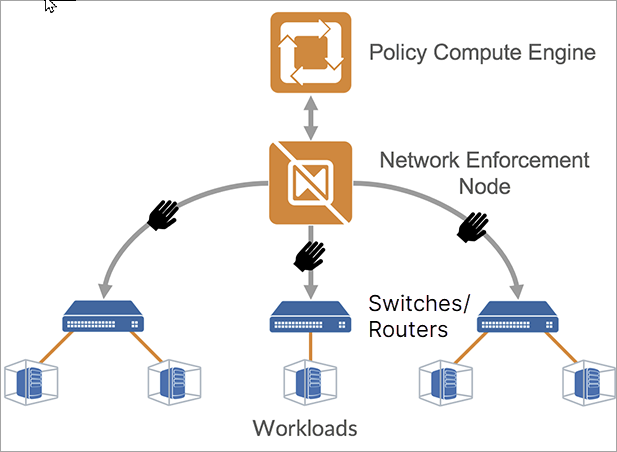
The Illumio policy model encompasses workloads with native stateful firewalls built-in, such as Linux iptables or Windows Filtering Platform. Although all systems might not have a firewall built in, they still have segmentation requirements. To solve this use case, Illumio has extended its policy model to switches.
Illumio administrators can use the NEN to convert natural language policies into ACLs, which the switches understand natively. Your organization's teams that use Illumio Core can download ACLs from the PCE and provide them to the networking team for review before applying new policies to the switches.