Shared Resources
Note
This feature is available only to on-premise deployments of 26.2.20-PCE and later, behind a feature flag. Please contact Illumio Support to enable this feature.
A shared resource is a server workload that you convert into a shared resource so it can use sub-labels. Shared resources let you assign multiple labels of the same label type to a single workload.
Use a shared resource when one workload hosts multiple services that belong to different logical groups, such as different environments, applications, or business units.
Why use Shared Resources
In a standard workload, you can assign only one value for each label type. For example, a workload can have one environment label and one application label.
This model works well when the entire workload belongs to one set of labels. It becomes more complex when a single workload hosts multiple services that should match different policy rules.
For example, a workload might host:
A database service for developers
An API service for testers
Without a shared resource, you can label the workload with one environment label, such as Development. To represent the second service with a different label, you must create a Bound Service or Virtual Service, attach it to the workload, and apply the additional label there.
This approach works, but it adds complexity:
You must create and manage extra service objects.
The additional label is not visible directly on the workload.
It is less obvious which rules apply to the workload.
A shared resource simplifies this model. Instead of using extra service objects to represent another label of the same type, you can assign the additional label directly to the workload as a sub-label.
How Shared Resources work
To use this feature, first convert a server workload into a Shared Resource by editing the workload and setting the Shared Resources toggle to yes. After conversion, you can assign sub-label sets to that workload. Each sub-label set can contain only one label per label type/dimension.
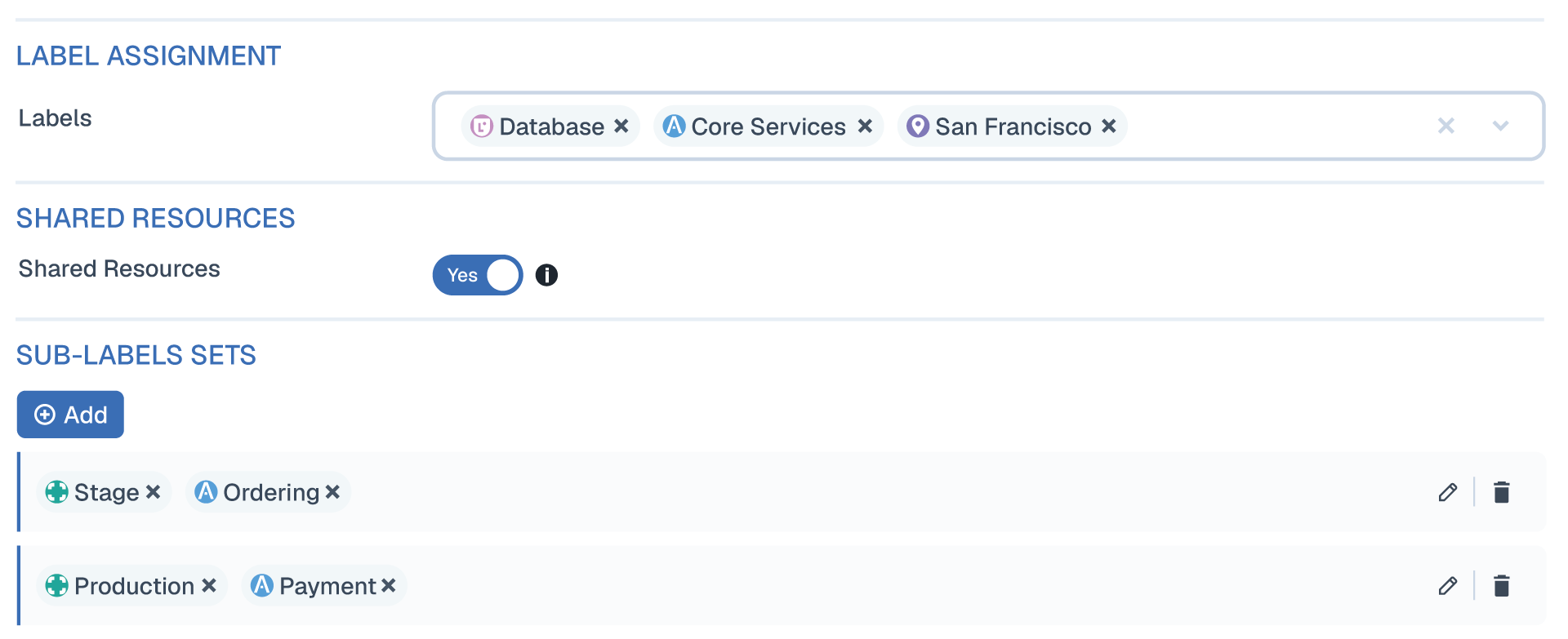
A sub-label set lets the shared resource carry multiple values for the same label type. This is the key difference between a standard workload and a Shared Resource.
A Shared Resource uses:
Base labels to identify the workload itself
Sub-label sets to define relationships to the applications or services that consume it
Shared Resource Example
A Shared Resource can include multiple values for the same label type through sub-labels.
Example:
Labels: Role=DB, Environment=Prod
Sub-label 1: Application = HRM
Sub-label 2: Application = Ticketing
You can then create rules such as:
Allow database traffic for HRM
Allow API traffic for Ticketing
In the shared resource model:
Both labels are visible on the same workload.
You do not need extra Bound Service or Virtual Service objects to represent the second label.
It is easier to understand why different rules apply to the workload.
Benefits of Shared Resources
Shared resources provide the same policy outcome as earlier approaches, but with a simpler and more transparent model.
Key benefits include:
Fewer extra objects to create and manage
Labels are visible directly on the workload
Easier rule design for workloads that host multiple services
Clearer policy intent for users reviewing workloads and rules
Clearer policy intent for users reviewing workloads and rules
Policy behavior for Shared Resources
Shared resources affect policy evaluation in specific ways.
Deny Rules
Deny rules apply only to the base label set because multiple application contexts use a shared workload, and a deny rule in one context could unintentionally block access for the others.
Any label included in a sub-label set is ignored by deny rules.
When a label is included in a Shared Resource sub-label set, deny rules written against that label are not enforced for the Shared Resource’s sub-label membership.
In other words, deny rules that reference a label used as a Shared Resource sub-label do not block traffic to or from the Shared Resource based on that sub-label. The deny rule still applies to workloads outside the Shared Resource that use the same label directly.
Allow Rules
If an allow rule includes a label that is part of a sub-label set, policy evaluation creates a union of all of the allows on the sub-labels on the shared resource.
For example, if:
An allow rule permits traffic from App1 to App2
A Shared Resource has sub-labels for App2, App3, App4, and App5
Then traffic to that shared resource is allowed based on the full sub-label set associated with the shared resource, not only App2.
Override Deny Rules
Override deny rules are not supported for sub-label sets because they can affect every application that shares the workload, not just the application represented by one sub-label.
Override deny is a powerful policy construct. If it were allowed on a sub-label, one application owner could unintentionally block traffic needed by other applications that use the same shared resource. To avoid cross-application impact, Shared Resources only evaluates override deny rules against the workload’s base label set.
Limitations
Only Server VEN workloads can be converted into shared resources.
Unmanaged workloads and endpoint VENs cannot be converted into shared resources.
A shared resource must have base labels.
A shared resource can have up to 10 sub-label sets.
Each sub-label set can contain only one label per label type/dimension, duplicate sub-label sets are not allowed.
Shared resource behavior depends on the supported sub-label set combinations available in your release.
User interface behavior
Shared resources also affect how data appears in the product UI.
Map
When a workload becomes a shared resource, it appears in a shared resource group on the Illumio map, separate from standard app groups. When grouped by label type, they can appear under multi-role, multi-application, multi-environment, or multi-location depending on which label type has multiple values.
On the map, shared resources use a different icon from standard workloads.
When grouped by label type, a shared resource can appear as a rolled-up value such as:
Multi-environment
Multi-app
Multi-role
Multi-business unit
These names indicate that the workload has multiple values for that label type.
Tooltips can also show the sub-label sets associated with the shared resource.
Traffic Table
The traffic table includes additional columns or details to identify shared resources and their associated sub-label sets.